
From raw footage to shareable highlight reel
HoopCuts uses AI to watch every frame of your game video and automatically find the plays that matter — so you don't have to.
Upload your game footage
Drag and drop any MP4, MOV, or AVI file up to 500 MB. Enter the player's name and jersey number so HoopCuts knows who to track throughout the game.
Works with sideline recordings, gym cameras, and broadcast footage.
Upload your game footage
Drag and drop any MP4, MOV, or AVI file up to 500 MB. Enter the player's name and jersey number so HoopCuts knows who to track throughout the game.
Works with sideline recordings, gym cameras, and broadcast footage.
Choose your highlight types
Select from 21 play types across scoring, defense, and playmaking categories — dunks, 3-pointers, steals, assists, blocks, and more. Pick what matters to you.
Add custom instructions to guide the AI toward specific moments or situations.
Choose your highlight types
Select from 21 play types across scoring, defense, and playmaking categories — dunks, 3-pointers, steals, assists, blocks, and more. Pick what matters to you.
Add custom instructions to guide the AI toward specific moments or situations.
AI analyzes every frame
GPT-4o Vision scans your footage frame by frame, identifying the player by jersey number and detecting highlight-worthy plays with high confidence scoring.
Sequences of 4 frames are analyzed together for temporal context — the AI understands motion, not just snapshots.
AI analyzes every frame
GPT-4o Vision scans your footage frame by frame, identifying the player by jersey number and detecting highlight-worthy plays with high confidence scoring.
Sequences of 4 frames are analyzed together for temporal context — the AI understands motion, not just snapshots.
Review and refine your reel
Watch your auto-generated highlight reel. Click any clip to jump to it, remove clips you don't want, and give thumbs up or down to train the AI for future reels.
The Frame Inspector shows every frame the AI analyzed so you can see exactly how decisions were made.
Review and refine your reel
Watch your auto-generated highlight reel. Click any clip to jump to it, remove clips you don't want, and give thumbs up or down to train the AI for future reels.
The Frame Inspector shows every frame the AI analyzed so you can see exactly how decisions were made.
Export for social media
Export your reel in the perfect format for Instagram Reels, TikTok, YouTube Shorts, X, or full HD. HoopCuts re-encodes the video to match each platform's specs automatically.
Platform duration caps are enforced automatically. No editing software required.
Export for social media
Export your reel in the perfect format for Instagram Reels, TikTok, YouTube Shorts, X, or full HD. HoopCuts re-encodes the video to match each platform's specs automatically.
Platform duration caps are enforced automatically. No editing software required.
Built for coaches and families
Coaches
Break down game film faster. Filter for specific play types, review defensive sequences, and share clips with players for film study — all without manual scrubbing.
Parents
Capture every big moment your player has. Share polished highlight reels on social media straight from the app, formatted perfectly for each platform.
Players
Build your recruiting reel automatically. Every game adds to your highlight library, and you can export platform-ready clips to share with coaches and scouts.
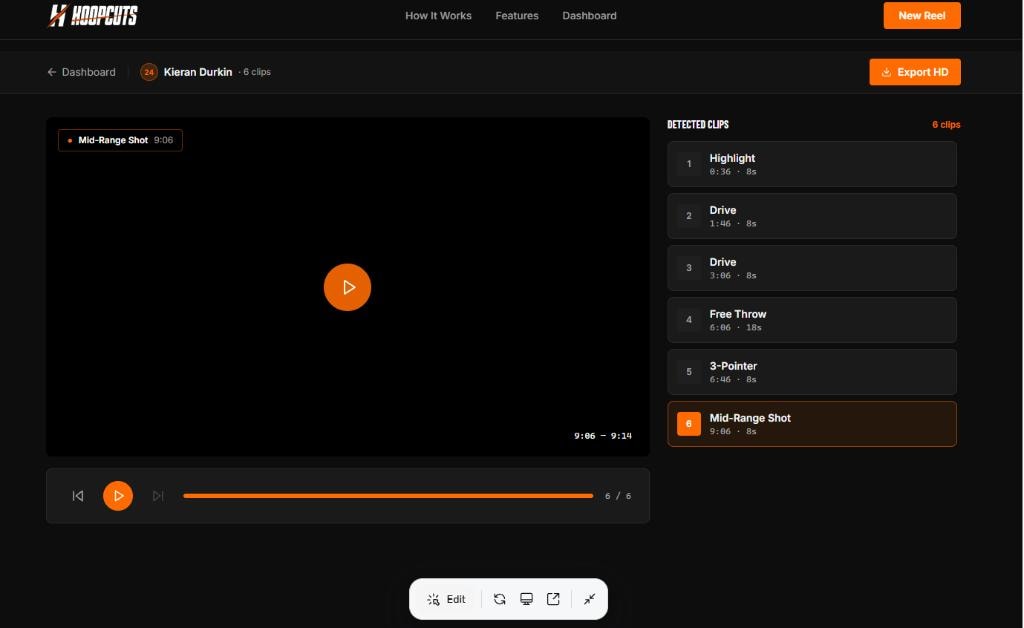
The reel viewer shows every detected clip with timestamps, clip feedback, and the AI Frame Inspector.
Ready to see it in action?
Upload a game and have your first highlight reel in minutes.
Create your first reel